Blog

  • Using CSS and JavaScript to Randomize Background Images

    Using CSS and JavaScript to Randomize Background Images

    I was working on a website and wanted to add a fun bit of flair by having the background rotate through a batch of images. So every time the website loaded it would have a different image. I did a little research, but none of the solutions were all that great. So I coded up my solution. I needed to be able to:

    • Randomize the images on page load
    • Set the random image on the body
    • Set the image on a pseudo-element ::backdrop

    Solution 1 – JS sets the style

    This was the first solution I ran across. I merged the original problem, with the solution to save time. What I dislike about this solution is the separation of concerns, and it uses “var” still.

    <head>
    <style>...</style>
    <script type="text/javascript">
            var totalCount = 8;
            function ChangeIt() {
                var num = Math.ceil(Math.random() * totalCount);
                document.body.style.background = "url('assets/bgImages/" + num + ".jpg') repeat";
    
            }
        </script>
    </head>
    <body>...</body>
    
    </html>
    <script type="text/javascript">
        ChangeIt();
    </script>
    

    Stackoverflow solution 1

    Solution 2 – JS inserts a stylesheet

    This was the second solution I ran across. I started looking for this because I needed to add the random background to a pseudo-element – “::backdrop” for a dialog I was working on. Because you can’t directly access this pseudo-object from JS (at least I couldn’t see how) I tried to insert the stylesheet method. It was messy, and now I had two functions doing the “same thing”.

    document.styleSheets[0].insertRule('#elid:hover { background-color: red; }', 0);
    document.styleSheets[0].cssRules[0].style.backgroundColor= 'red';
    
    //IE solution...
    document.styleSheets[0].addRule('#elid:hover', 'background-color: red', 0);
    document.styleSheets[0].rules[0].style.backgroundColor= 'red';

    Stackoverflow Solution 2https://stackoverflow.com/a/311437

    One commenter pointed out security issues, and I hated how messy this was. SO MUCH CSS in JS… ?

    My solution – Set a class

    To keep the CSS and styling out of the JS, don’t cross the streams, I let JS change the classes and left the styling in CSS.

    This was a more elegant solution and allowed me to never edit the JS code if I wanted to switch images. This is a complete example with some “fixer” js to clear the classes off for the demo. Click around and have some fun.

    • Random <body> background-image
    • Random <div> background-image
    • Random <dialog> ::backdrop background-image

    With this code and some css animations, you can create some really fun effects for your site.

    See the Pen Random Background via class by Joel Cory (@Joel-Cory) on CodePen.
  • New Saw …New Crosscut Sled

    New Saw …New Crosscut Sled

    Out with the old

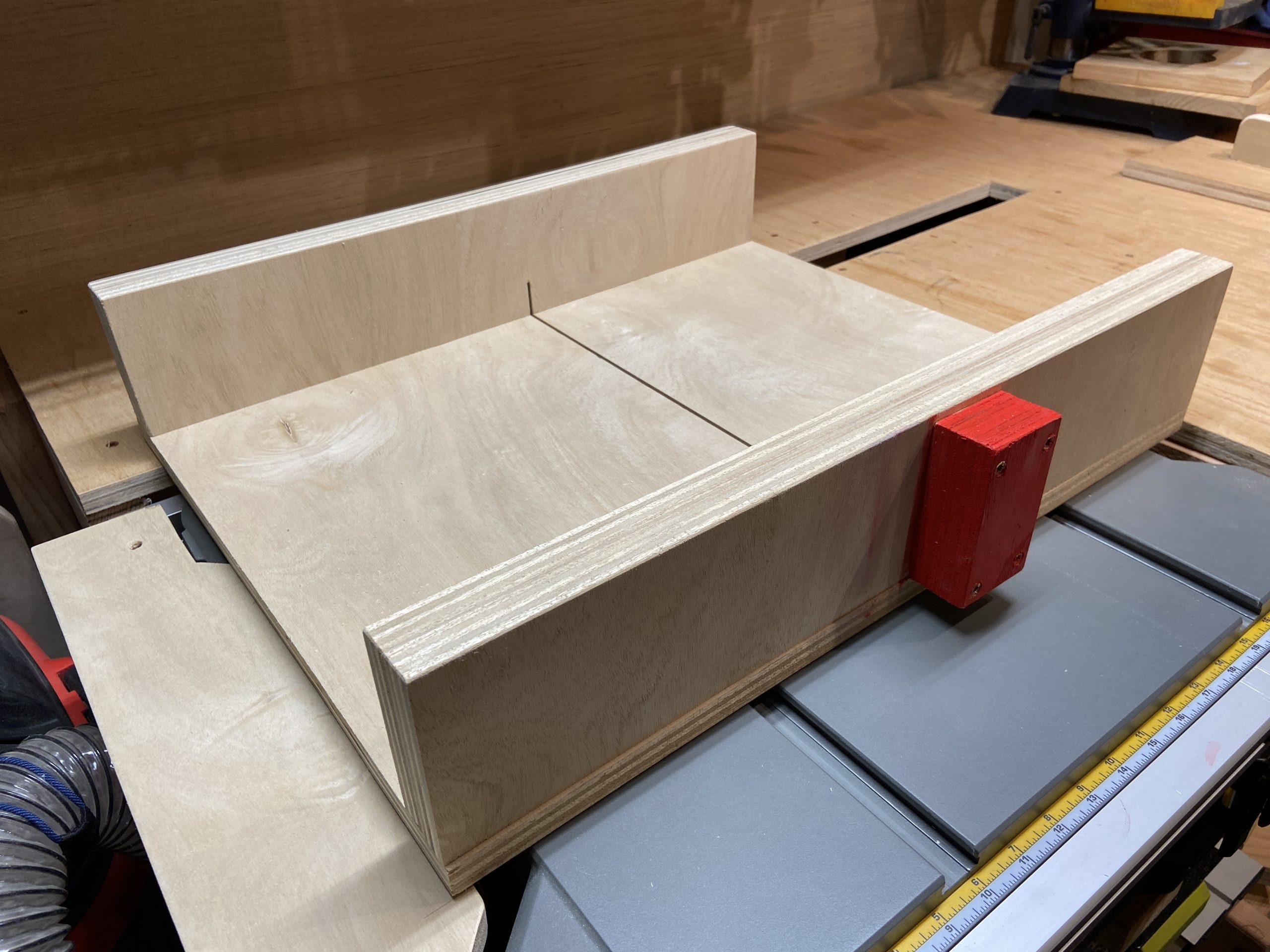
    So with the new saw, I needed to update a few of the jigs I had. The first one I needed was a new crosscut sled. I couldn’t reuse the old sled for a few reasons, which I will describe in a bit. Now I can use standard accessories on the table saw. Yeah! The only downside was that I’d have to rebuild my current sled, which was a blessing in disguise.


    Mistakes Made

    So the first mistake I made was buying that old table saw. Sorta. But back to the sled. The sled I built was square and ran smoothly, but because of the wobble in the blade the slot had widened up so that it was hard to tell where to line up the piece I was cutting. The old saw had 5/8 inch rails, bad. The new saw has 3/4 inch rail, good. Additionally I made the mistake of testing a miter cut on the sled, and the wedge cut out of it made the alignment issue even worse. I posted a picture on my instagram, it’s bad.

    https://www.instagram.com/p/CJrI5obpi5D/?utm_source=ig_web_copy_link

    A Clean Start

    Starting over was nice. Clean wood, all new, freshly cut, and not a hodgepodge of scaps I had in the garage. I just started using nice plywood for a lot of my jigs and I love it. I used Sande Plywood, as Lowes didn’t have Baltic birch at the time. It’s nice a nice low void ply with a smooth finish.

    I also low using High Density Poly Ethylene (HDPE) for my rails…

    Why so popular? Here’s why:

    • It’s lightweight yet super-strong. That’s why an HDPE milk jug that weighs 2 ounces can carry a gallon of milk. And why many carmakers use HDPE fuel tanks—lighter weight car parts can help increase fuel efficiency.
    • It’s impact resistant. Drop the toy truck down the stairs and it bounces.
    • It’s long lasting and weather resistant, so that plastic lumber deck in the backyard can entertain generations of families.
    • It resists mold, mildew, rotting, and insects, so it’s great for underground pipes used to deliver water.
    • And it’s easily molded into nearly any shape, providing one of the primary benefits of most plastics: malleability.

    What is HDPE Source

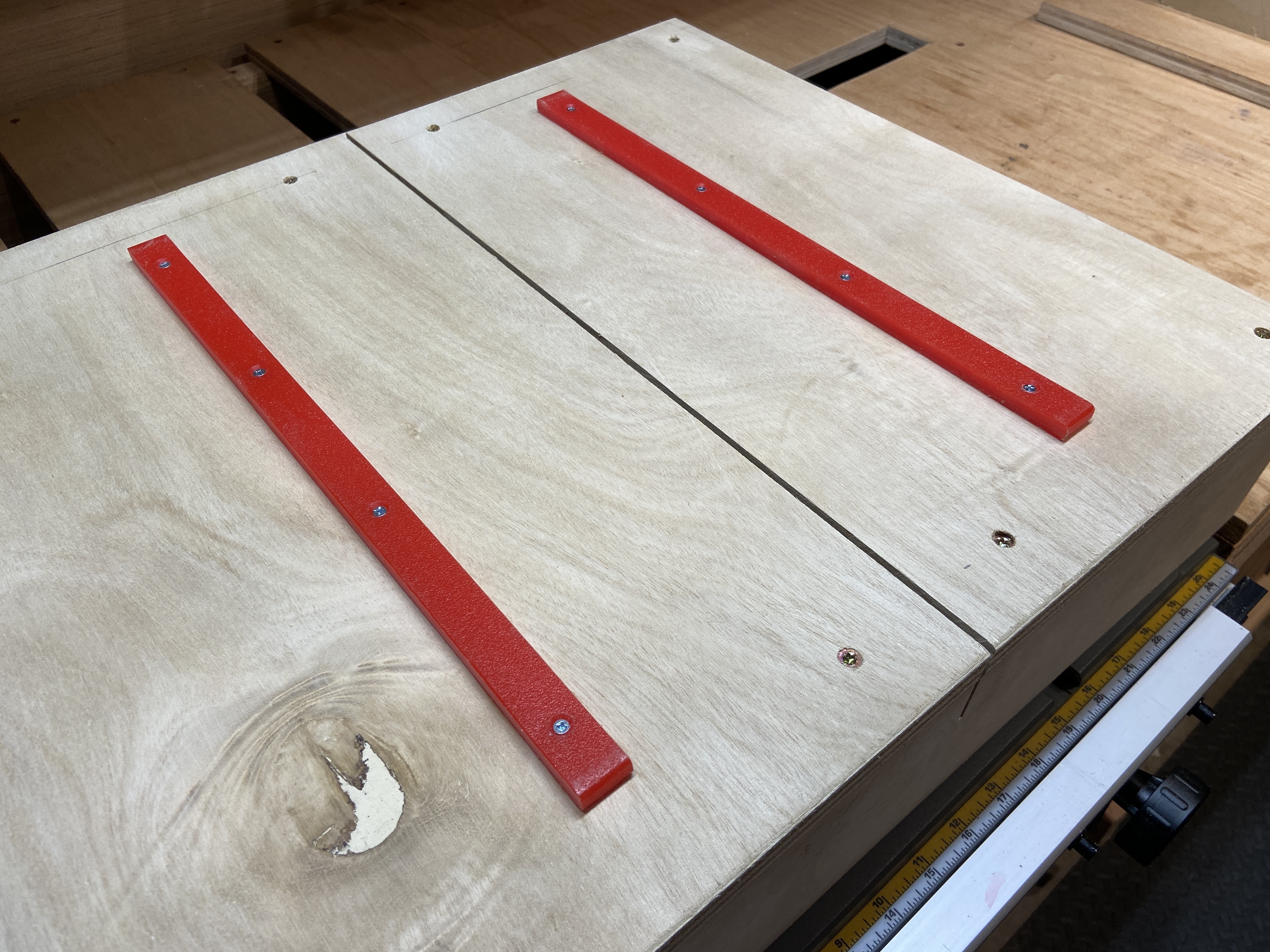
    Its a plastic so you need a sharp blade to cut it. Preferably a specific blade for plastic. My new table saw has an amazing stock blade so I tried it and it was almost perfect. I did need to plane the edges to the correct dimension but that was pretty easy.

    They turned out great:HDPE Rail Details

    HDPE makes great rails because they slide well, and they’re super durable. This was a cutting board in a former life.

    The Finished Sled

    I won’t go into details on how I made this, there are a ton of videos out on youtube.  Video 2 is great because Mr. Ng describes how to verify its square… (Video 1, Video 2, Video 3)

    Basically I ripped four 4″ strips of 3/4 ply for the front and back, laminating them together. I cut the slide to the width of the table saw, but the depth was based on my storage space. A little shallower than I wanted, but it fits under my saw in the workbench. I also added a thumb-no-go-block, so I would remember to keep my fingers away from the blade… small detail but worth it.

    Here is the finished sled:

  • Stacked Dust Collection Cart

    Stacked Dust Collection Cart

    New Stacked Design

    Before I start any project I research what everyone else has done. I look through Youtube, Pinterest and do a few Google searches for what other builders had created for dust collection carts. For this project I wanted something super compact, moveable, and stable.  I started by researching shop vacs, and dust collection systems. Stumpy Nubs had a great video on 11 Common Dust Collection Mistakes.  After watching this I decided that a shop vac was a better choice because of all the small tools i used (orbital sander, track saw, bench top sander etc).

    The Rigid VAC4000 seemed to fit the bill perfectly. Small, powerful, lightweight, and great reviews.

    I started with an rotated cart design like this design I found on pinterest. I tried it for a while, but I had to disable the wet vac float mechanism, because gravity wouldn’t keep the float down because it was sideways. I also thought it took up a lot of room, especially if I used a Dust Deputy cyclone, they’re tall.

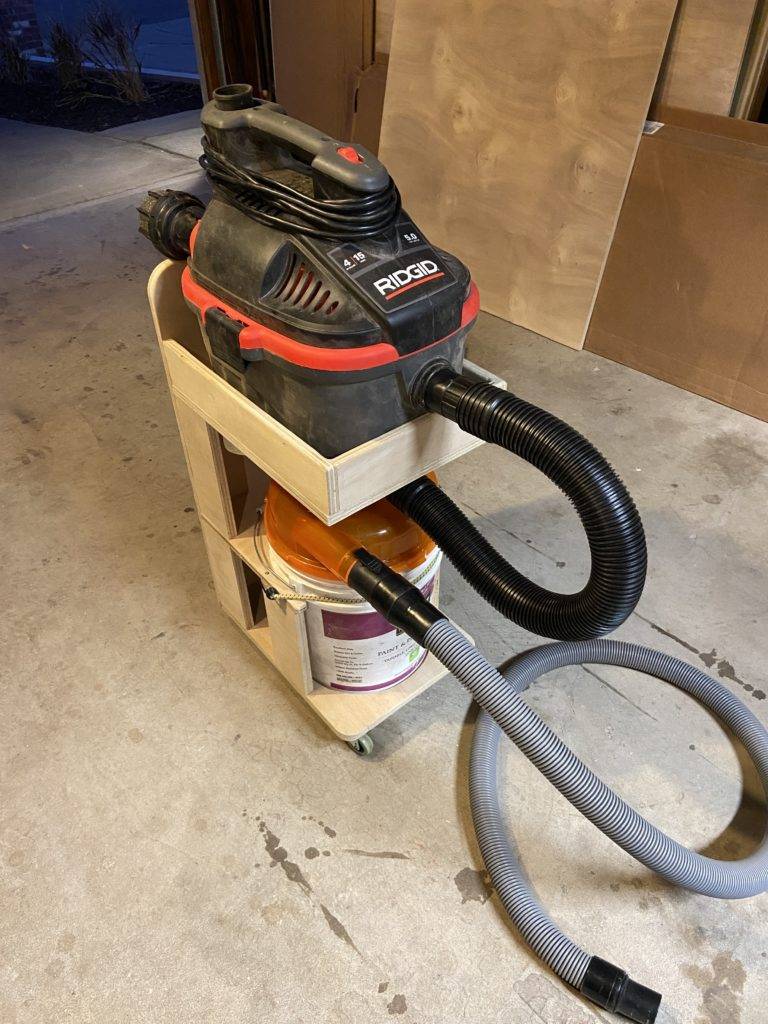
    My design is a stacked dust cart design, reducing the footprint to that of the vacuum itself. With the shop vac on top, I could lift it off and use it separately when I needed to.

    Here is what I ended up with:

    It turned out well. It rolls around quite easily, and it’s stable. It’s also a much smaller cart than the one I’d mocked up before.

    Dust Stopper Modification

    One other thing of note. When I first assembled the Dust Stopper my suction was terrible… I had read someplace that there were leaks around the bucket lip, so I added some weather stripping… Boom, huge improvement. So if you get a Dust Stopper, add a seal around the bucket.

    Weather Strip

  • Movable Table Saw WorkBench

    Movable Table Saw WorkBench

    The Old WorkBench

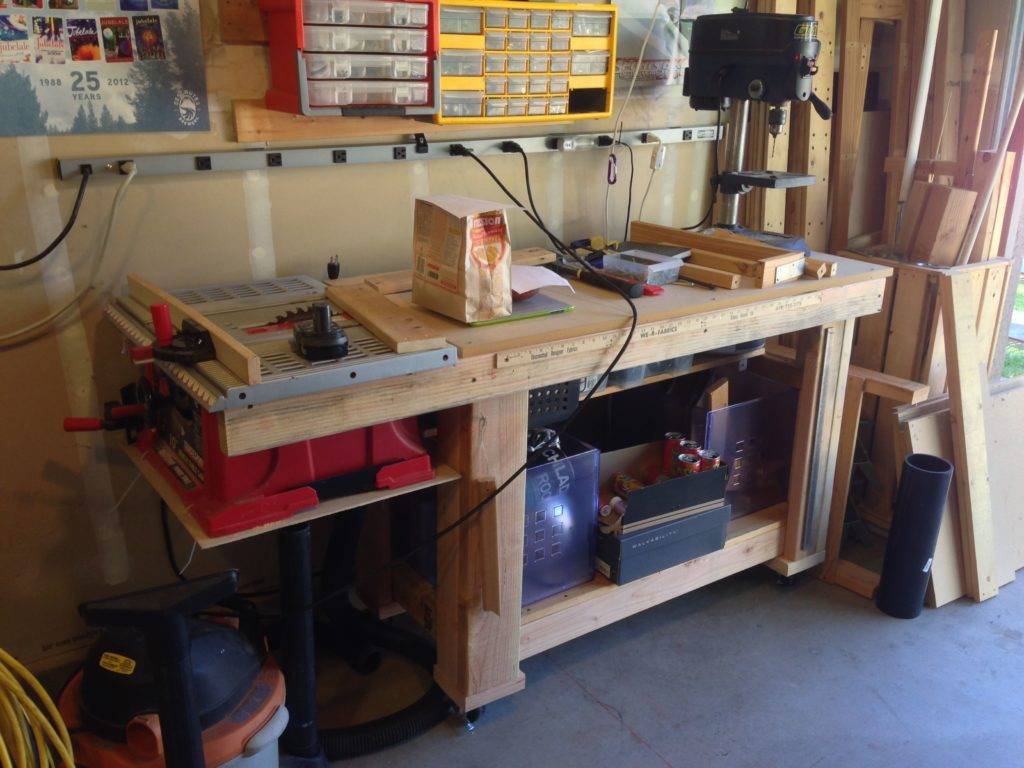
    My old workbench was frustrating me one day, so I started designing a new movable table saw workbench. The table surface was small, and the storage underneath was hard to use and limited. A small shelf underneath, and the top was only 24 inches deep. I was always trying to push parts and tools to the back while I was working… but there was no room. The table saw was in an awkward position, cantilevered off the left side.

    Old Workbench

    Poking around on Pinterest and YouTube I found a few ideas for mobile table saw workbenches:

    I started drawing my ideas to work out some of the details and variations. Eventually I settled on something, and figured out my cut list, and materials.

    The New WorkBench

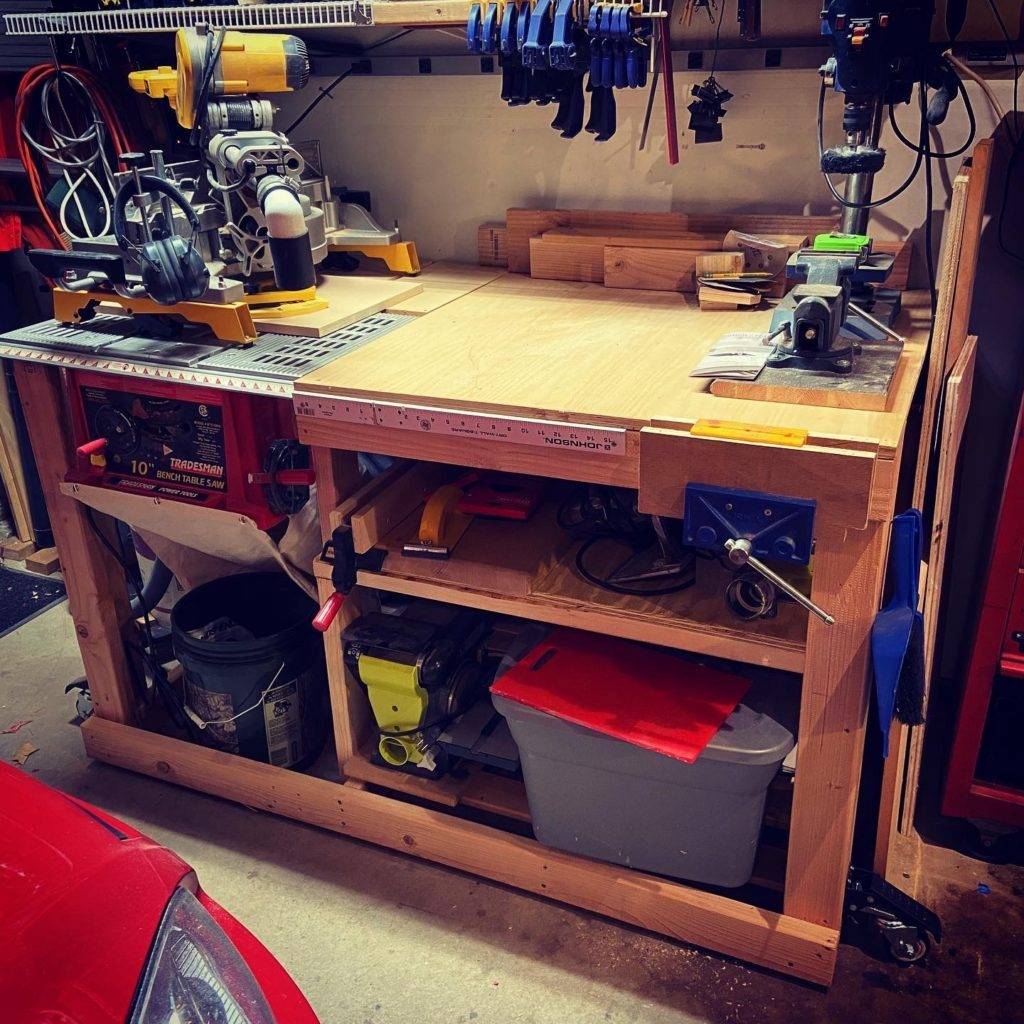
    The new design was so much better. The new table has a 36″ square surface. The table saw is oriented so that it faces forward. Now I can stand in front of the the bench and make cuts. I had more storage underneath, because the shelves ran the full width, and I lowered the floor gaing about 4 more inches of height.

    New Workbench.. Crappy Saw
    Saw Detail

    The Crappy Saw

    Now I was all set… Except my Tradesman Table saw was crap:

    • No dust collection at all
    • Undersized miter tracks (5/8″) so nothing fit
    • The fence doesn’t square so I have to triple check the front and the back of the blade for every cut
    • The blade wobbled a bit, so my wood was always rubbing and burning

    While watching videos on building your own fence… I asked myself: Why are you wasting more time trying to polish this turd…

    I bought a Dewalt DWE7485 and tore the top half of the bench apart so that I could rebuild it to fit the new saw.

    New Saw, and Revised Workbench

    Now I had full use of the fence. The work is supported on both sides. The miter slots aren’t blocked so running a sled is easy. This thing cuts like butter. I can also lift the saw out and use it on saw horses if I need to.

    Here’s a gallery of my sketches.

  • Our Browsers Lie

    Our Browsers Lie

    Our Problem

    As UI Designers, UX Designers, and Web Developers our main goal is to provide the best experience possible to the users of our products. Sadly our first means of determining who this user is is their browser. Browsers lie and omit. Let us count the ways:

    1. They tell us through the user agent that they are someone else
    2. Our phones tell us they are desktops because they don’t use the mobile media type, even though we are all walking around with them in our pockets
    3. Our desktops now support touch events, even though there is a mouse connected, and the person really likes to use it more than putting greasy fingerprints on their fancy monitor
    4. Our tablets and phones tell us that they are big monitors because they support higher resolutions than our old computers

    Methods of Failure

    So here are the tools we have to solve the problem, and they are terrible tools.

    • User Agent Detection: Massive fail for years now, because of #1, and it gets worse every year (IE11 posing as Mozilla)
    • Media Queries: These fail because of #4 above.
    • JavaScript Feature Detection: These fail because of new browsers merging the touch and click events, as well as #3

    My Proposal

    Here’s what I propose we do about it.

    • Media queries:  Because the screen size information is still valuable, but inadequate for mobile/touch detection
    • JavaScript Feature Detection: Knowing if a device potentially supports touch events is informative, but may lead to false positives
    • A Toggle: Let the user decide. As a user, I know how I use my computer, and even if my computer/browser supports touch I may not use it because I have a mouse connected to my phone/tablet/desktop

    My Wish

    If I could influence the browser and OS developers to make the world a kinder gentler world for us lowly UI/UX Designers/Web developers I would ask them to stop lying to us.

    1. Make the user agent tell us the truth: OS (desktop/mobile, version, bits), Browser (brand, version), Hardware (mouse, touch)
    2. Give us back our mobile media query: My phone has a screen, yes, but it is a mobile screen, not a 19-30″ monitor so don’t tell me it’s the same
  • De-reflector the Aero

    De-reflector the Aero

    I hated the cluttered rear on this bike. So I cleared off the reflectors. I’m going to add lights down the road to increase the visibility. (more…)

  • Quick-er release seat

    Quick-er release seat

    I wanted to be able to quickly remove my passenger seat when I was riding solo. (more…)

  • New Motorcycle: 1999 Honda Shadow Aero

    New Motorcycle: 1999 Honda Shadow Aero

    I just acquired a 1999 Honda Shadow Aero, the VT1100C3. So far I love it. (more…)

  • Safari 5 Download Page – Major Oops

    Safari 5 Download Page – Major Oops

    I started to download Safari 5 for mac to see what it would offer when I discovered that Senior Jobs started forgetting usability…

    Oops.

    (more…)
  • Welcome to Apple’s Standards (not ours)

    Welcome to Apple’s Standards (not ours)

    Apple has this great site they just opened, touting the glories of web standards. Yee-haw I say, a publicly facing, corporate campaign to push web standards and tear down the failures of the past… Oops, I was wrong:

    (more…)